IP Softphone Connection Lost Error - version 10.0.1
-
Joe_1086
IP Softphone Connection Lost Error - version 10.0.1
I am having a problem with remote users going through vpn with IP softphone version 10.0.1. It will connect, but constantly says connection lost, and I am unable to maintain a stable connection. VPN not blocking anything for the entire subnet. Can anyone help with this?
-
tincho.rn
Re: IP Softphone Connection Lost Error - version 10.0.1
Hi. I do not have any problem with that softphone. I believe it is network related problem. Test it locally, without vpn. Regards
-
cavagnaro
Re: IP Softphone Connection Lost Error - version 10.0.1
Over internet? Over dedicated line? Check connectivity and bandwidth issues...packets lost? continuity is tested? AS tincho says it is more a WAN issue rather than software issue.
-
Joe_1086
Re: IP Softphone Connection Lost Error - version 10.0.1
I get the error "Destination host unreachable" whenever it actually makes a connection -- ie someone picks up, voice mail, etc. Softphone goes strait to "Connection Lost" as soon as the other end picks up. I have tested it locally from my pc and remotely from my VPN and it works fine. It just seems to be for one user. All firewall and VPN rules are identical to mine. I am trying to track down the cause but having no success whatsoever. I am wondering if it is a specific setting that I am missing for the user's setup. Anyone know of any bugs with windows 7?
-
cavagnaro
Re: IP Softphone Connection Lost Error - version 10.0.1
Not at all, as you say, it is something specific to that user. The error itself is explanatory, connection lost means that, maybe your user bandwidth is too poor, lost of packets, etc.
Also try to use the last version of the softphone
Also try to use the last version of the softphone
-
fbedia
Re: IP Softphone Connection Lost Error - version 10.0.1
You marked this option?
Maybe the problem comes from the VPN Configuration
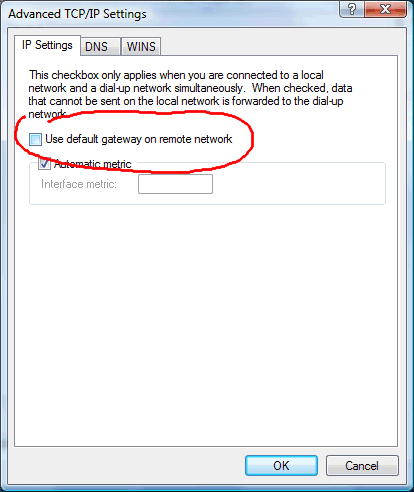
Maybe the problem comes from the VPN Configuration
-
andre_iub
Re: IP Softphone Connection Lost Error - version 10.0.1
I have the same problem, I formated my workstation and the problem persists. I disconnected my extension of my workstation and connected on another workstation on the same network (DNS and GATEWAY) and it worked perfectly.
Version - Alcatel Lucent 10.0.0.3 - IP Desktop SoftPhone 4068 for windows
Nome do sistema operacional: Microsoft Windows 7 Enterprise
Versão do sistema operacional: 6.1.7601 Service Pack 1 compilação 7601
Fabricante do sistema operacional: Microsoft Corporation
Tipo de compilação do sistema operacional: Multiprocessor Free
Fabricante do sistema: Dell Inc.
Modelo do sistema: Dell System Vostro 3450
Tipo de sistema: x64-based PC
Processador(es): 1 processador(es) instalado(s).
[01]: Intel64 Family 6 Model 42 Stepp
Version - Alcatel Lucent 10.0.0.3 - IP Desktop SoftPhone 4068 for windows
Nome do sistema operacional: Microsoft Windows 7 Enterprise
Versão do sistema operacional: 6.1.7601 Service Pack 1 compilação 7601
Fabricante do sistema operacional: Microsoft Corporation
Tipo de compilação do sistema operacional: Multiprocessor Free
Fabricante do sistema: Dell Inc.
Modelo do sistema: Dell System Vostro 3450
Tipo de sistema: x64-based PC
Processador(es): 1 processador(es) instalado(s).
[01]: Intel64 Family 6 Model 42 Stepp
